Spacing & Pacing Guide (Best Practice + Accessibility)
All recommendations below use existing spacing tokens and utilities such as --space-*, in-*, out-*, and gap-*.
1) Text blocks (headings, paragraphs, lists)
- Heading - following paragraph: use a smaller gap than body flow.
Suggested:out-b-smon the heading orout-t-smon the paragraph. - Paragraph - paragraph: use a steady reading rhythm.
Suggested:out-b-mdon paragraphs or a consistent parent flow pattern. - Lists: space items a bit tighter than paragraphs for scanning.
Suggested: list container without-dwn-y-xsto space eachli.
2) Section breaks (rows / banded areas)
- Major section separation: clearly larger than text flow.
Suggested: applyin-y-lgto each section band andout-y-xlbetween sections. - Subsections: slightly smaller than major breaks.
Suggested:out-y-lg.
3) Components (cards, panels, buttons)
- Card/panel internal padding: at least one body line-height all around.
Suggested:in-md(compact) orin-lg(comfortable). - Card title - body: follow heading - paragraph spacing.
Suggested:out-b-smon the title. - Buttons (tap target): minimum 44px target size guidance still applies.
Suggested: use the existing button classes and adjust with spacing utilities only when needed.
4) Global rhythm (vertical pacing)
- Use the scale consistently:
xxs/xsfor micro-gaps,sm/mdfor text flow,lg/xlfor sections and rows. - Favor tokens over ad-hoc values: keeps pages predictable and easier to maintain.
- Grid gaps: set inter-column and row space with
gap-*matching nearby vertical rhythm.
5) Accessibility specifics
- Line-height: body copy should use the paragraph line-height tokens and remain readable.
- Touch targets: interactive elements should still meet the 44px minimum guidance.
- Whitespace helps readability: consistent spacing improves comprehension and focus. Don’t compress text blocks too tightly.
6) Practical defaults (drop-in patterns)
- Generic content flow: wrap content in a container and give children a steady rhythm.
Suggested: parent wrapper usesout-dwn-y-md. - Heading - paragraph:
out-b-smon the heading orout-t-smon the paragraph. - Paragraph - paragraph:
out-b-mdon the paragraph. - Section/row break:
out-y-xlon the section container; inside, usein-y-lg. - Cards:
in-md(compact) orin-lg(comfortable) plus titleout-b-sm. - Grids:
gap-mdfor balanced layouts; increase togap-lgin media-heavy sections.
Summary
Use small gaps (xxs/xs/sm) for micro and heading-to-text spacing, medium gaps (md) for paragraph rhythm, and large gaps (lg/xl) for section and row separation. Favor the existing tokens and utilities (in-*, out-*, gap-*) for consistency and accessibility.
Element - Recommended Spacing Map
| Element / Context | Recommended Token/Class | Rationale |
|---|---|---|
| Heading - paragraph | out-b-sm (heading) or out-t-sm (paragraph) |
Tighter than paragraph flow; quicker start-reading cue. |
| Paragraph - paragraph | out-b-md |
Steady reading rhythm. |
List items (within ul/ol) |
out-dwn-y-xs on the list |
Compact item separation for scanning. |
| Nested lists | out-dwn-y-xxs on the nested list |
Slightly tighter to show hierarchy. |
| Card/panel padding | in-md (compact) / in-lg (comfortable) |
Breathing room around content without bloat. |
| Card title - body | out-b-sm on the title |
Follows heading-to-paragraph best practice. |
| Buttons (tap target) | Use existing button classes; adjust with spacing utilities only if needed | Helps support accessible target sizing. |
| Section/row separation | out-y-xl between sections; inside use in-y-lg |
Clear scanning boundaries between content blocks. |
| Generic flow wrapper | out-dwn-y-md on the parent |
Applies a consistent vertical rhythm to children. |
| Grids (cards/images) | gap-md (increase to gap-lg for media-dense) |
Balances visual rhythm with nearby content. |
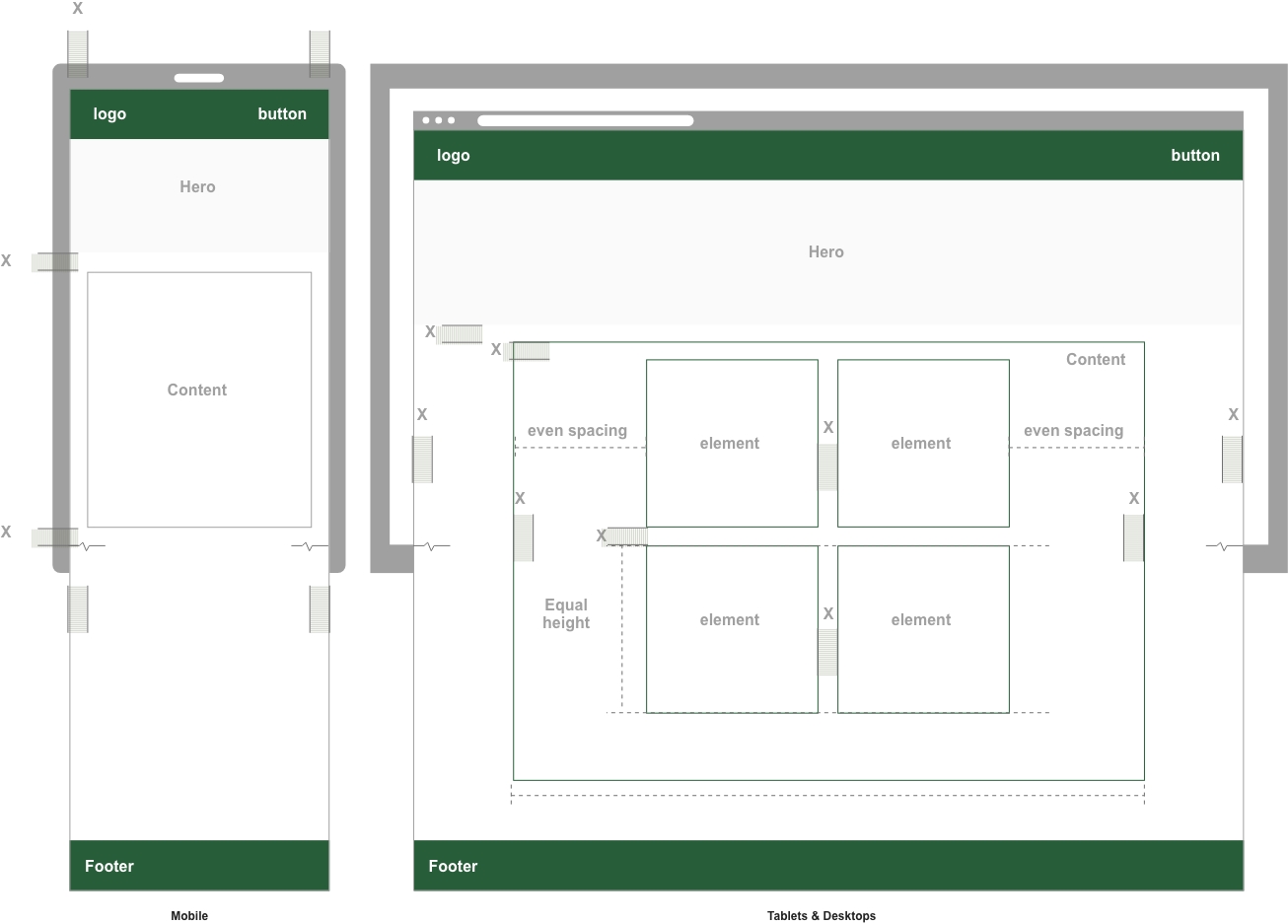
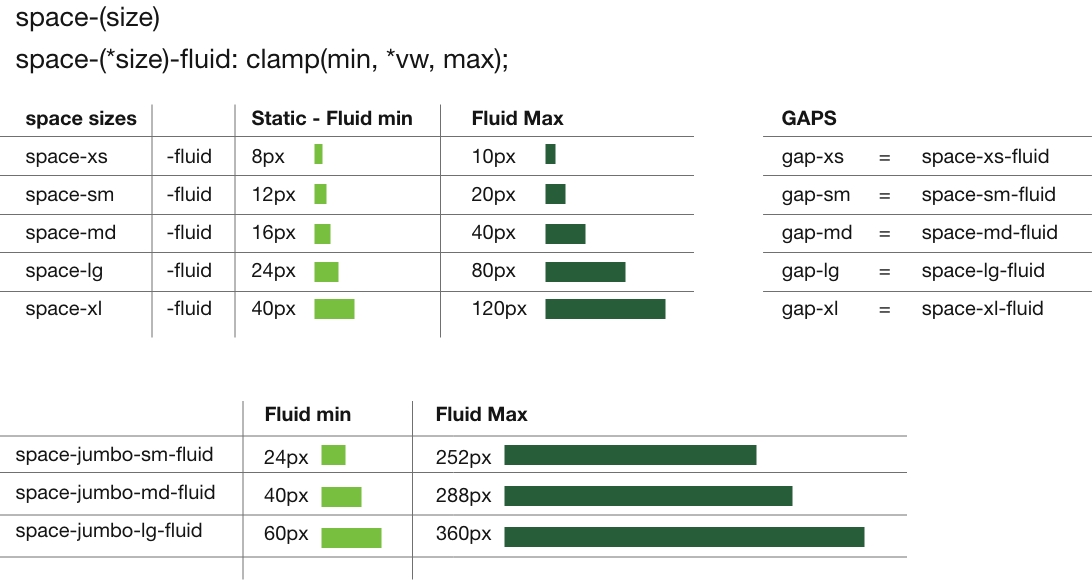
The design system defines a scalable spacing framework using semantic CSS custom properties such as --space-sm and --space-lg to control vertical and horizontal rhythm across the UI, including padding, margins, and gaps.
Fixed reference values are paired with fluid clamp()-based values to adapt responsively across viewports, helping maintain consistent proportions from small mobile screens to large desktops. Utility classes like .in-* and .out-* apply these values with directional naming, while cascading classes like .in-dwn-* and .out-dwn-* support structured layouts.
The system follows modern CSS best practices by using relative units, avoiding random one-off spacing values, and separating layout logic from component styles. From a WCAG perspective, spacing has no single required ratio, but clear separation between UI elements supports readability, focus visibility, and accessible touch targets.
The spacing utilities are intended for modern browsers. All tokens are defined in :root to support overrides and theming. For best accessibility, spacing should work alongside proper focus indicators, semantic structure, and responsive layout behavior.
Browser Support for Fluid Spacing System
| Feature | Support | Notes |
|---|---|---|
| :root Variables | Full | Supported in all major browsers except Internet Explorer. |
| clamp() | Modern browsers | Supported in current Chrome, Safari, Edge, and Firefox. |
| vw Units | Full | Supported in all major browsers. |
| Fluid Spacing (clamp with vw) | Modern browsers | Used throughout the spacing token system. |
WCAG Accessibility Considerations for Fluid Spacing
| Concern | Status | Notes |
|---|---|---|
| Tap Target Size | Good | Spacing and padding can help support the 44px target size guidance in WCAG 2.2. |
| Content Readability | Good | Line-height and spacing improve paragraph readability and support text spacing and reflow guidance. |
| Consistent Layout | Good | Predictable spacing reduces cognitive load and improves scanability. |
| Responsive Scaling | Good | Spacing scales smoothly across screen sizes, helping reduce layout crowding and reflow problems. |
Legacy Browser Note
| Area | Status | Notes |
|---|---|---|
| Modern browsers | Supported | This spacing system is built for modern evergreen browsers. |
| Internet Explorer | Not supported | CSS variables and clamp() are not supported there. |
| Older enterprise environments | Limited | Legacy environments may not render the full fluid token system correctly. |
| Variable | Clamp Value | Min (px) | Preferred | Max (px) | Used In |
|---|---|---|---|---|---|
| --space-xxs | clamp(0.222rem, 0.5vw, 0.333rem) | 4px | 0.5vw | 6px | --gap-xxs, .gap-xxs, .v-spacer-xxs |
| --space-xs | clamp(0.444rem, 1vw, 0.556rem) | 8px | 1vw | 10px | --gap-xs, .gap-xs, .v-spacer-xs |
| --space-sm | clamp(0.667rem, 2vw, 1.111rem) | 12px | 2vw | 20px | --gap-sm, .gap-sm, .v-spacer-sm |
| --space-md | clamp(0.889rem, 3vw, 2.222rem) | 16px | 3vw | 40px | --gap-md, .gap-md, .v-spacer-md |
| --space-lg | clamp(1.333rem, 8vw, 4.444rem) | 24px | 8vw | 80px | --gap-lg, .gap-lg, .v-spacer-lg |
| --space-xl | clamp(2.222rem, 10vw, 6.666rem) | 40px | 10vw | 120px | --gap-xl, .gap-xl, .v-spacer-xl |
| Root Variable | Type | Static REM Value | Static PX Value | Related Fluid Clamp | Used By / Connected To |
|---|---|---|---|---|---|
| --space-xxs-static | Space | 0.222rem | 4px | --space-xxs = clamp(0.222rem, 0.5vw, 0.333rem) | --gap-xxs, .gap-xxs, .v-spacer-xxs |
| --space-xs-static | Space | 0.444rem | 8px | --space-xs = clamp(0.444rem, 1vw, 0.556rem) | --gap-xs, .gap-xs, .v-spacer-xs |
| --space-sm-static | Space | 0.667rem | 12px | --space-sm = clamp(0.667rem, 2vw, 1.111rem) | --gap-sm, .gap-sm, .v-spacer-sm |
| --space-md-static | Space | 0.889rem | 16px | --space-md = clamp(0.889rem, 3vw, 2.222rem) | --gap-md, .gap-md, .v-spacer-md |
| --space-lg-static | Space | 1.333rem | 24px | --space-lg = clamp(1.333rem, 8vw, 4.444rem) | --gap-lg, .gap-lg, .v-spacer-lg |
| --space-xl-static | Space | 2.222rem | 40px | --space-xl = clamp(2.222rem, 10vw, 6.666rem) | --gap-xl, .gap-xl, .v-spacer-xl |
| --bs-sm-static | Border | 0.1111rem | 2px | --bs-sm = clamp(0.0556rem, 0.1vw, 0.1111rem) | General border sizing |
| --bs-md-static | Border | 0.2222rem | 4px | --bs-md = clamp(0.1667rem, 0.3vw, 0.2222rem) | General border sizing |
| --bs-lg-static | Border | 0.3333rem | 6px | --bs-lg = clamp(0.2778rem, 0.4vw, 0.3333rem) | General border sizing |
| --radius-sm | Radius | 0.2222rem | 4px | — | Used for small rounded elements |
| --radius-md | Radius | 0.4444rem | 8px | — | Used for base rounded elements |
| --radius-lg | Radius | 0.5556rem | 10px | — | Used for large rounded elements |
| --radius-full | Radius | 9999px | full | — | Used for pills and circles |
Headline - class on parent container: in-dwn-b-sm
in = padding, dwn = child level elements, b = bottom, sm = space-sm
Pad children bottom (sm)
The technology behind modern smartphones has evolved rapidly over the last decade. What was once a basic communication tool has transformed into a powerful pocket-sized computer. With features like facial recognition, AI-driven photography, and real-time language translation, the devices we carry daily are more powerful than the systems used to land humans on the moon.
padding override in-t-lg In the middle of a quiet forest, a small cabin stood alone, surrounded by towering pines and the distant sound of a creek. The air was crisp and filled with the scent of earth and bark. Inside, a fire crackled softly in the hearth while a kettle whistled gently on the stove. For the first time in weeks, Elise felt at peace.
Class on parent container: in-dwn-y-md
in = padding, dwn = child level elements, y = top and bottom, md = space-md
Adds equal padding to top and bottom of each child.
The technology behind modern smartphones has evolved rapidly over the last decade. What was once a basic communication tool has transformed into a powerful pocket-sized computer. With features like facial recognition, AI-driven photography, and real-time language translation, the devices we carry daily are more powerful than the systems used to land humans on the moon.
padding override .in-lg Adding a class such as .in-lg will override the child level class. In the middle of a quiet forest, a small cabin stood alone, surrounded by towering pines and the distant sound of a creek. The air was crisp and filled with the scent of earth and bark. Inside, a fire crackled softly in the hearth while a kettle whistled gently on the stove. For the first time in weeks, Elise felt at peace.
Padding - Margin visual samples
Added media queries for md:, lg:, and xl: responsive utility versions.
Use filters to reduce visible content and scrolling.
All sides
in-xs
This card uses in-xs to apply padding spacing. This creates space between the content and its surroundings.
in-sm
This card uses in-sm to apply padding spacing. This creates space between the content and its surroundings.
in-md
This card uses in-md to apply padding spacing. This creates space between the content and its surroundings.
in-lg
This card uses in-lg to apply padding spacing. This creates space between the content and its surroundings.
in-xl
This card uses in-xl to apply padding spacing. This creates space between the content and its surroundings.
Top and Bottom
in-y-xs
This card uses in-y-xs to apply padding spacing. This creates space between the content and its surroundings.
in-y-sm
This card uses in-y-sm to apply padding spacing. This creates space between the content and its surroundings.
in-y-md
This card uses in-y-md to apply padding spacing. This creates space between the content and its surroundings.
in-y-lg
This card uses in-y-lg to apply padding spacing. This creates space between the content and its surroundings.
in-y-xl
This card uses in-y-xl to apply padding spacing. This creates space between the content and its surroundings.
Left and Right
in-x-xs
This card uses in-x-xs to apply padding spacing. This creates space between the content and its surroundings.
in-x-sm
This card uses in-x-sm to apply padding spacing. This creates space between the content and its surroundings.
in-x-md
This card uses in-x-md to apply padding spacing. This creates space between the content and its surroundings.
in-x-lg
This card uses in-x-lg to apply padding spacing. This creates space between the content and its surroundings.
in-x-xl
This card uses in-x-xl to apply padding spacing. This creates space between the content and its surroundings.
TOP
in-t-xs
This card uses in-t-xs to apply padding spacing. This creates space between the content and its surroundings.
in-t-sm
This card uses in-t-sm to apply padding spacing. This creates space between the content and its surroundings.
in-t-md
This card uses in-t-md to apply padding spacing. This creates space between the content and its surroundings.
in-t-lg
This card uses in-t-lg to apply padding spacing. This creates space between the content and its surroundings.
in-t-xl
This card uses in-t-xl to apply padding spacing. This creates space between the content and its surroundings.
Bottom
in-b-xs
This card uses in-b-xs to apply padding spacing. This creates space between the content and its surroundings.
in-b-sm
This card uses in-b-sm to apply padding spacing. This creates space between the content and its surroundings.
in-b-md
This card uses in-b-md to apply padding spacing. This creates space between the content and its surroundings.
in-b-lg
This card uses in-b-lg to apply padding spacing. This creates space between the content and its surroundings.
in-b-xl
This card uses in-b-xl to apply padding spacing. This creates space between the content and its surroundings.
Left
in-l-xs
This card uses in-l-xs to apply padding spacing. This creates space between the content and its surroundings.
in-l-sm
This card uses in-l-sm to apply padding spacing. This creates space between the content and its surroundings.
in-l-md
This card uses in-l-md to apply padding spacing. This creates space between the content and its surroundings.
in-l-lg
This card uses in-l-lg to apply padding spacing. This creates space between the content and its surroundings.
in-l-xl
This card uses in-l-xl to apply padding spacing. This creates space between the content and its surroundings.
Right
in-r-xs
This card uses in-r-xs to apply padding spacing. This creates space between the content and its surroundings.
in-r-sm
This card uses in-r-sm to apply padding spacing. This creates space between the content and its surroundings.
in-r-md
This card uses in-r-md to apply padding spacing. This creates space between the content and its surroundings.
in-r-lg
This card uses in-r-lg to apply padding spacing. This creates space between the content and its surroundings.
in-r-xl
This card uses in-r-xl to apply padding spacing. This creates space between the content and its surroundings.
Use filters to reduce visible content and scrolling.
All sides
out-xs
This card uses out-xs to apply margin spacing. This creates space between the content and its surroundings.
out-sm
This card uses out-sm to apply margin spacing. This creates space between the content and its surroundings.
out-md
This card uses out-md to apply margin spacing. This creates space between the content and its surroundings.
out-lg
This card uses out-lg to apply margin spacing. This creates space between the content and its surroundings.
out-xl
This card uses out-xl to apply margin spacing. This creates space between the content and its surroundings.
Top and Bottom
out-y-xs
This card uses out-y-xs to apply margin spacing. This creates space between the content and its surroundings.
out-y-sm
This card uses out-y-sm to apply margin spacing. This creates space between the content and its surroundings.
out-y-md
This card uses out-y-md to apply margin spacing. This creates space between the content and its surroundings.
out-y-lg
This card uses out-y-lg to apply margin spacing. This creates space between the content and its surroundings.
out-y-xl
This card uses out-y-xl to apply margin spacing. This creates space between the content and its surroundings.
Left and Right
out-x-xs
This card uses out-x-xs to apply margin spacing. This creates space between the content and its surroundings.
out-x-sm
This card uses out-x-sm to apply margin spacing. This creates space between the content and its surroundings.
out-x-md
This card uses out-x-md to apply margin spacing. This creates space between the content and its surroundings.
out-x-lg
This card uses out-x-lg to apply margin spacing. This creates space between the content and its surroundings.
out-x-xl
This card uses out-x-xl to apply margin spacing. This creates space between the content and its surroundings.
Top
out-t-xs
This card uses out-t-xs to apply margin spacing. This creates space between the content and its surroundings.
out-t-sm
This card uses out-t-sm to apply margin spacing. This creates space between the content and its surroundings.
out-t-md
This card uses out-t-md to apply margin spacing. This creates space between the content and its surroundings.
out-t-lg
This card uses out-t-lg to apply margin spacing. This creates space between the content and its surroundings.
out-t-xl
This card uses out-t-xl to apply margin spacing. This creates space between the content and its surroundings.
Bottom
out-b-xs
This card uses out-b-xs to apply margin spacing. This creates space between the content and its surroundings.
out-b-sm
This card uses out-b-sm to apply margin spacing. This creates space between the content and its surroundings.
out-b-md
This card uses out-b-md to apply margin spacing. This creates space between the content and its surroundings.
out-b-lg
This card uses out-b-lg to apply margin spacing. This creates space between the content and its surroundings.
out-b-xl
This card uses out-b-xl to apply margin spacing. This creates space between the content and its surroundings.
Left
out-l-xs
This card uses out-l-xs to apply margin spacing. This creates space between the content and its surroundings.
out-l-sm
This card uses out-l-sm to apply margin spacing. This creates space between the content and its surroundings.
out-l-md
This card uses out-l-md to apply margin spacing. This creates space between the content and its surroundings.
out-l-lg
This card uses out-l-lg to apply margin spacing. This creates space between the content and its surroundings.
out-l-xl
This card uses out-l-xl to apply margin spacing. This creates space between the content and its surroundings.
Right
out-r-xs
This card uses out-r-xs to apply margin spacing. This creates space between the content and its surroundings.
out-r-sm
This card uses out-r-sm to apply margin spacing. This creates space between the content and its surroundings.
out-r-md
This card uses out-r-md to apply margin spacing. This creates space between the content and its surroundings.
out-r-lg
This card uses out-r-lg to apply margin spacing. This creates space between the content and its surroundings.
out-r-xl
This card uses out-r-xl to apply margin spacing. This creates space between the content and its surroundings.
Use filters to reduce visible content and scrolling.
All sides
in-jumbo-sm
This card uses in-jumbo-sm to apply padding spacing. This creates space between the content and its surroundings.
in-jumbo-md
This card uses in-jumbo-md to apply padding spacing. This creates space between the content and its surroundings.
in-jumbo-lg
This card uses in-jumbo-lg to apply padding spacing. This creates space between the content and its surroundings.
Top and Bottom
in-jumbo-y-sm
This card uses in-jumbo-y-sm to apply padding spacing. This creates space between the content and its surroundings.
in-jumbo-y-md
This card uses in-jumbo-y-md to apply padding spacing. This creates space between the content and its surroundings.
in-jumbo-y-lg
This card uses in-jumbo-y-lg to apply padding spacing. This creates space between the content and its surroundings.
Left and Right
in-jumbo-x-sm
This card uses in-jumbo-x-sm to apply padding spacing. This creates space between the content and its surroundings.
in-jumbo-x-md
This card uses in-jumbo-x-md to apply padding spacing. This creates space between the content and its surroundings.
in-jumbo-x-lg
This card uses in-jumbo-x-lg to apply padding spacing. This creates space between the content and its surroundings.
Top
in-jumbo-t-sm
This card uses in-jumbo-t-sm to apply padding spacing. This creates space between the content and its surroundings.
in-jumbo-t-md
This card uses in-jumbo-t-md to apply padding spacing. This creates space between the content and its surroundings.
in-jumbo-t-lg
This card uses in-jumbo-t-lg to apply padding spacing. This creates space between the content and its surroundings.
Bottom
in-jumbo-b-sm
This card uses in-jumbo-b-sm to apply padding spacing. This creates space between the content and its surroundings.
in-jumbo-b-md
This card uses in-jumbo-b-md to apply padding spacing. This creates space between the content and its surroundings.
in-jumbo-b-lg
This card uses in-jumbo-b-lg to apply padding spacing. This creates space between the content and its surroundings.
Left
in-jumbo-l-sm
This card uses in-jumbo-l-sm to apply padding spacing. This creates space between the content and its surroundings.
in-jumbo-l-md
This card uses in-jumbo-l-md to apply padding spacing. This creates space between the content and its surroundings.
in-jumbo-l-lg
This card uses in-jumbo-l-lg to apply padding spacing. This creates space between the content and its surroundings.
Right
in-jumbo-r-sm
This card uses in-jumbo-r-sm to apply padding spacing. This creates space between the content and its surroundings.
in-jumbo-r-md
This card uses in-jumbo-r-md to apply padding spacing. This creates space between the content and its surroundings.
in-jumbo-r-lg
This card uses in-jumbo-r-lg to apply padding spacing. This creates space between the content and its surroundings.
Use filters to reduce visible content and scrolling.
All sides
out-jumbo-sm
This card uses out-jumbo-sm to apply margin spacing. This creates space between the content and its surroundings.
out-jumbo-md
This card uses out-jumbo-md to apply margin spacing. This creates space between the content and its surroundings.
out-jumbo-lg
This card uses out-jumbo-lg to apply margin spacing. This creates space between the content and its surroundings.
Top and Bottom
out-jumbo-y-sm
This card uses out-jumbo-y-sm to apply margin spacing. This creates space between the content and its surroundings.
out-jumbo-y-md
This card uses out-jumbo-y-md to apply margin spacing. This creates space between the content and its surroundings.
out-jumbo-y-lg
This card uses out-jumbo-y-lg to apply margin spacing. This creates space between the content and its surroundings.
Left and Right
out-jumbo-x-sm
This card uses out-jumbo-x-sm to apply margin spacing. This creates space between the content and its surroundings.
out-jumbo-x-md
This card uses out-jumbo-x-md to apply margin spacing. This creates space between the content and its surroundings.
out-jumbo-x-lg
This card uses out-jumbo-x-lg to apply margin spacing. This creates space between the content and its surroundings.
Top
out-jumbo-t-sm
This card uses out-jumbo-t-sm to apply margin spacing. This creates space between the content and its surroundings.
out-jumbo-t-md
This card uses out-jumbo-t-md to apply margin spacing. This creates space between the content and its surroundings.
out-jumbo-t-lg
This card uses out-jumbo-t-lg to apply margin spacing. This creates space between the content and its surroundings.
Bottom
out-jumbo-b-sm
This card uses out-jumbo-b-sm to apply margin spacing. This creates space between the content and its surroundings.
out-jumbo-b-md
This card uses out-jumbo-b-md to apply margin spacing. This creates space between the content and its surroundings.
out-jumbo-b-lg
This card uses out-jumbo-b-lg to apply margin spacing. This creates space between the content and its surroundings.
Left
out-jumbo-l-sm
This card uses out-jumbo-l-sm to apply margin spacing. This creates space between the content and its surroundings.
out-jumbo-l-md
This card uses out-jumbo-l-md to apply margin spacing. This creates space between the content and its surroundings.
out-jumbo-l-lg
This card uses out-jumbo-l-lg to apply margin spacing. This creates space between the content and its surroundings.
Right
out-jumbo-r-sm
This card uses out-jumbo-r-sm to apply margin spacing. This creates space between the content and its surroundings.
out-jumbo-r-md
This card uses out-jumbo-r-md to apply margin spacing. This creates space between the content and its surroundings.
out-jumbo-r-lg
This card uses out-jumbo-r-lg to apply margin spacing. This creates space between the content and its surroundings.
Fluid Margin & Padding Helpers
See Grid and Flex classes for layout. Containers (.container-*) set page width only and should not define spacing rhythm. Use the spacing utilities below for consistent internal and external spacing. Gap utilities are available as --gap-* tokens and .gap-* classes.
:root {

  /* ----------------------------------- Spacing tokens -------------------- */
  --space-xxs: clamp(0.222rem, 0.5vw, 0.333rem); /* ~4–6px */
  --space-xs:  clamp(0.444rem, 1vw, 0.556rem);   /* ~8–10px */
  --space-sm:  clamp(0.667rem, 2vw, 1.111rem);   /* ~12–20px */
  --space-md:  clamp(0.889rem, 3vw, 2.222rem);   /* ~16–40px */
  --space-lg:  clamp(1.333rem, 8vw, 4.444rem);   /* ~24–80px */
  --space-xl:  clamp(2.222rem, 10vw, 6.666rem);  /* ~40–120px */

  --space-xxs-static: 0.222rem;
  --space-xs-static:  0.444rem;
  --space-sm-static:  0.667rem;
  --space-md-static:  0.889rem;
  --space-lg-static:  1.333rem;
  --space-xl-static:  2.222rem;

  /* ----------------------------------- Jumbo spacing --------------------- */
  --space-jumbo-sm: clamp(1.333rem, 14vw, 14rem);
  --space-jumbo-md: clamp(2.222rem, 16vw, 16rem);
  --space-jumbo-lg: clamp(3.333rem, 25vw, 20rem);

  /* ----------------------------------- Gap tokens ------------------------ */
  --gap-none: 0px;
  --gap-xxs: var(--space-xxs);
  --gap-xs: var(--space-xs);
  --gap-sm: var(--space-sm);
  --gap-md: var(--space-md);
  --gap-lg: var(--space-lg);
  --gap-xl: var(--space-xl);
}

/* ****************************************** SPACING *************************
Add space between sections with vertical spacers.
**************************************************************************** */

<div class="v-spacer-sm" aria-hidden="true" role="presentation"></div>

.v-spacer-xxs { height: var(--space-xxs); }
.v-spacer-xs  { height: var(--space-xs); }
.v-spacer-sm  { height: var(--space-sm); }
.v-spacer-md  { height: var(--space-md); }
.v-spacer-lg  { height: var(--space-lg); }
.v-spacer-xl  { height: var(--space-xl); }

------------------------------- Examples: padding and margin helpers

in = padding
out = margin

• .out-lg       (add large margin on all sides)
• .in-sm        (add small padding on all sides)

• .out-y-lg     (add large margin to top & bottom)
• .in-x-sm      (add small padding to left & right)

• .in-dwn-x-sm  (add small left/right padding to child elements)
• .out-dwn-lg   (add large margins to child elements)

--------------------------------------------------------------------------------
Class extensions

dwn  = cascade to child elements
dwn2 = cascade to grandchildren (skip a level)

• in-Ax-dwn-*   add padding to child elements
• out-Ax-dwn-*  add margin(s) to child elements

* = size options
Use size to define the space: xxs, xs, sm, md, lg, xl

Ax = axis options
y = top & bottom
x = left & right
l = left
r = right
t = top
b = bottom

-- extended size options — jumbo
in-jumbo-Ax-*
out-jumbo-Ax-*

* = jumbo sizes: sm, md, lg
Example: .in-jumbo-y-sm  (add jumbo padding to top and bottom)
Example: .out-jumbo-y-sm (add jumbo margin to top and bottom)

--------------------------
To override inherited child spacing, apply a more specific spacing utility on that element directly.
--------------------------

General guidance
- Use .v-spacer-* to create space between sections.
- Prefer padding (in-*) for internal spacing; use margins (out-*) to separate blocks.
- hr elements can use margin classes; padding is not recommended:
  <hr class="out-y-lg" aria-hidden="true" role="presentation">
- As an alternative spacer:
  <div class="v-spacer-lg" aria-hidden="true" role="presentation"></div>
- Standard line breaks <br> are for inline content only.It seems that you have reduce motion enabled!